On 18 September 2025, Fortra published an advisory for its GoAnywhere managed file transfer product. The flaw, CVE-2025-10035, was rated 10 out of 10, and within weeks Microsoft was reporting that a ransomware group was exploiting it. Software whose whole job is moving files securely had become the way in.
If that sounds familiar, it's because it keeps happening. Accellion's file transfer appliance in 2020. GoAnywhere and then MOVEit in 2023. Cleo at the end of 2024. GoAnywhere again in 2025. Different vendors, different bugs, and the same lesson every time: a server full of files is worth attacking.
That's a good place to start a look at where secure file sharing stands in 2026. Some of what follows is about attackers, some about AI, some about regulation, and some about a question that used to be niche and now isn't: who holds the key?
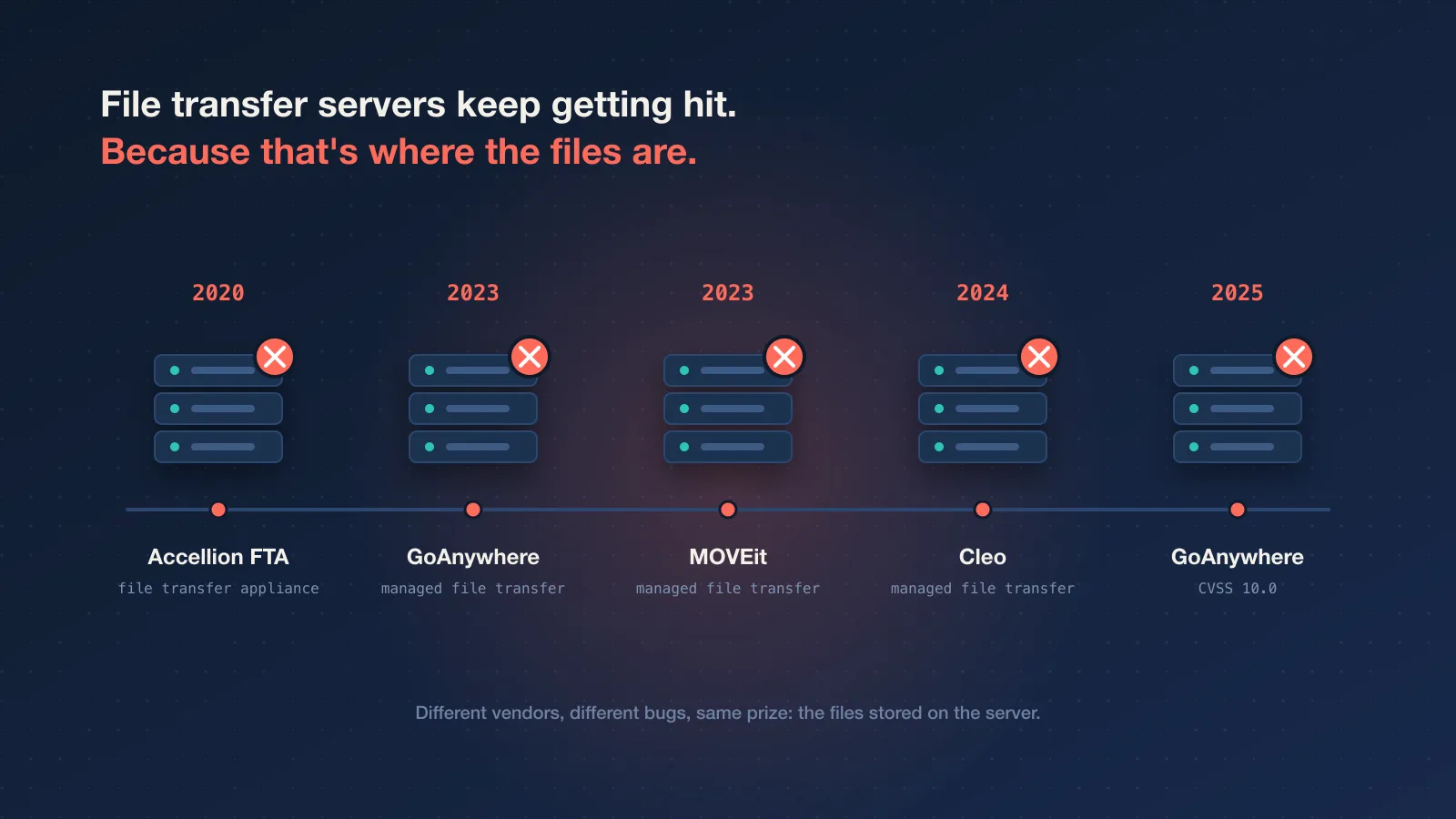
1. The file transfer server is the target
Managed file transfer systems are built for reliability and audit. They sit on the internet, accept files from partners, and keep them, sometimes for a very long time. That last part is what makes them attractive. Break into one, and you don't get one company's data. You get every file every customer left there.
The MOVEit campaign in 2023 showed how big that can get: thousands of organisations, most of whom had never heard of the group that hit them. The Cleo attacks at the end of 2024 followed the same playbook.
Two things limit the damage when a file sharing service is breached, and neither is a firewall:
- The service can't read the files. If files are encrypted on the sender's device and the key never reaches the server, a stolen copy is ciphertext.
- The files aren't there anymore. A file deleted after delivery can't be stolen next month.
Neither is exotic. Both are design choices, and it's worth asking any secure file transfer service which ones it made.
2. Third parties are now half the problem
Verizon's 2026 Data Breach Investigations Report, published in May, put two numbers side by side that are worth reading together:
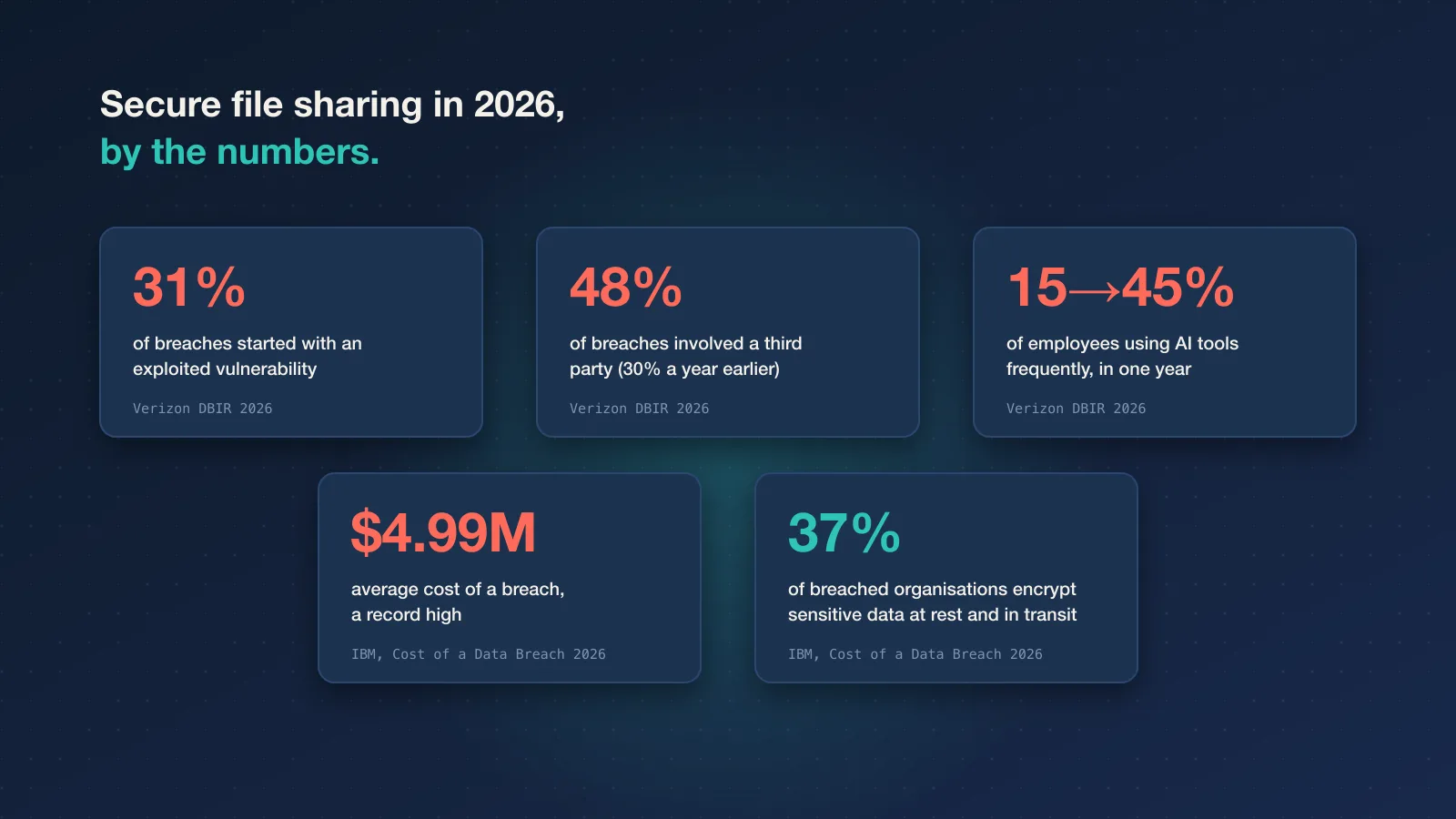
- 31% of breaches started with exploiting a software vulnerability, overtaking stolen credentials as the top way in for the first time in the report's 19 years.
- 48% of breaches involved a third party, up from 30% the year before.
Your file sharing tool is a third party. So is your email provider, your cloud drive and every integration with access to them. That doesn't mean you shouldn't use vendors (you have to), but it changes the questions worth asking. "Is it secure?" gets a yes from everyone. "What can you read, and what do you keep?" gets more useful answers.
3. AI tools changed where files end up
The same Verizon report found that frequent use of AI tools by employees went from 15% to 45% in a single year, and called out unapproved "shadow AI" as a growing source of data leakage. Every one of those tools is a place where a pasted contract or an uploaded spreadsheet can end up.
The other direction matters too. AI assistants built into email and office suites can now search everything a user has access to, which includes years of old attachments. In June 2025, researchers disclosed EchoLeak (CVE-2025-32711), a flaw in Microsoft 365 Copilot where a crafted email could have made the assistant pull internal data and send it out. Microsoft fixed it before any known abuse. But it made a point that will outlast the bug: a sensitive file sitting in an inbox is now reachable by one more path than it used to be.
Then there's what file sharing providers themselves may do with your content. In July 2025, WeTransfer revised new terms of service after users read a clause about machine learning as permission to train AI on their files. The company said it doesn't do that and rewrote the wording. The episode is still a useful reminder to read what a service is allowed to do with what you upload. With client-side encryption, the question mostly answers itself: a provider can't train on, scan or sell what it can't read.
4. "Who holds the key?" went mainstream
For years, end-to-end encryption was something messaging apps advertised and file sharing services mostly didn't. That has shifted. Apple, Google and others now offer modes where the provider doesn't hold the keys to your cloud data, and buyers increasingly ask about it in security reviews.
It has also become a political subject. In February 2025, Apple stopped offering Advanced Data Protection to new users in the UK after the government demanded access under the Investigatory Powers Act, and the legal dispute was still going in 2026. Whatever you think of the policy question, the episode put a technical detail in the news: what a provider can be asked to hand over, or can lose in a breach, depends on whether it holds the key.
For file sharing, the practical version is simple. Ask whether files are encrypted before upload, and where the key lives. "Encrypted at rest" on its own usually means the provider encrypts the disk and keeps the key, which protects against a stolen hard drive and not much else. We've explained the difference in end-to-end encryption explained.
5. Post-quantum encryption arrived quietly
NIST published its first post-quantum encryption standard, FIPS 203 (ML-KEM), in August 2024. Since then, major browsers and large networks have switched on hybrid post-quantum key exchange for TLS by default, so a growing share of ordinary HTTPS traffic is already protected against "record now, decrypt later" attacks without anyone changing a setting.
What this means for files is less dramatic than headlines suggest. AES-256, the symmetric cipher most file encryption uses, is generally considered safe against known quantum attacks. The bigger long-term risk is data that sits around for decades in mailboxes and archives, waiting for whatever breaks next. Files that are deleted after delivery have a much shorter shelf life for anyone planning to decrypt them later.
6. Regulation caught up with suppliers
Three EU rules shaped 2025 and 2026 for many businesses:
- DORA has applied to financial entities since 17 January 2025, with detailed expectations for ICT third-party risk.
- NIS2 has been rolling into national law across the EU. Germany's implementation act took effect on 6 December 2025, bringing many more companies into scope, with management liability and a 24-hour early warning for significant incidents.
- The Cyber Resilience Act made vulnerability and incident reporting mandatory for manufacturers of digital products from 11 September 2026.
None of these says "use tool X for file sharing". What they share is an expectation that you know your suppliers, know where your data goes, and can answer quickly when something goes wrong. That's much easier when sensitive files don't linger in a dozen places. GDPR's storage limitation principle has said the same thing since 2018; we've written about it in secure file sharing for European businesses. (As always, this is a summary, not legal advice.)
It also shows up in the numbers. IBM's 2026 Cost of a Data Breach report put the global average breach at a record $4.99 million, and found that only 37% of breached organisations encrypted sensitive data both at rest and in transit.
What hasn't changed
For all of that, the everyday picture looks a lot like it did five years ago. Contracts still go out as email attachments. Passwords still get pasted into chat "just this once". Cloud drive links still default to working forever. The tools got better; the habits didn't move much.
That's mostly because the secure option is often the slower one. If sending a file securely takes longer than attaching it, people attach it. Any approach that hopes to change behaviour has to be at least as quick as the habit it replaces. We went through the most common ones in 5 everyday sharing habits that leak sensitive data and, for email specifically, why email attachments are a security risk.
How to choose a secure file transfer service in 2026
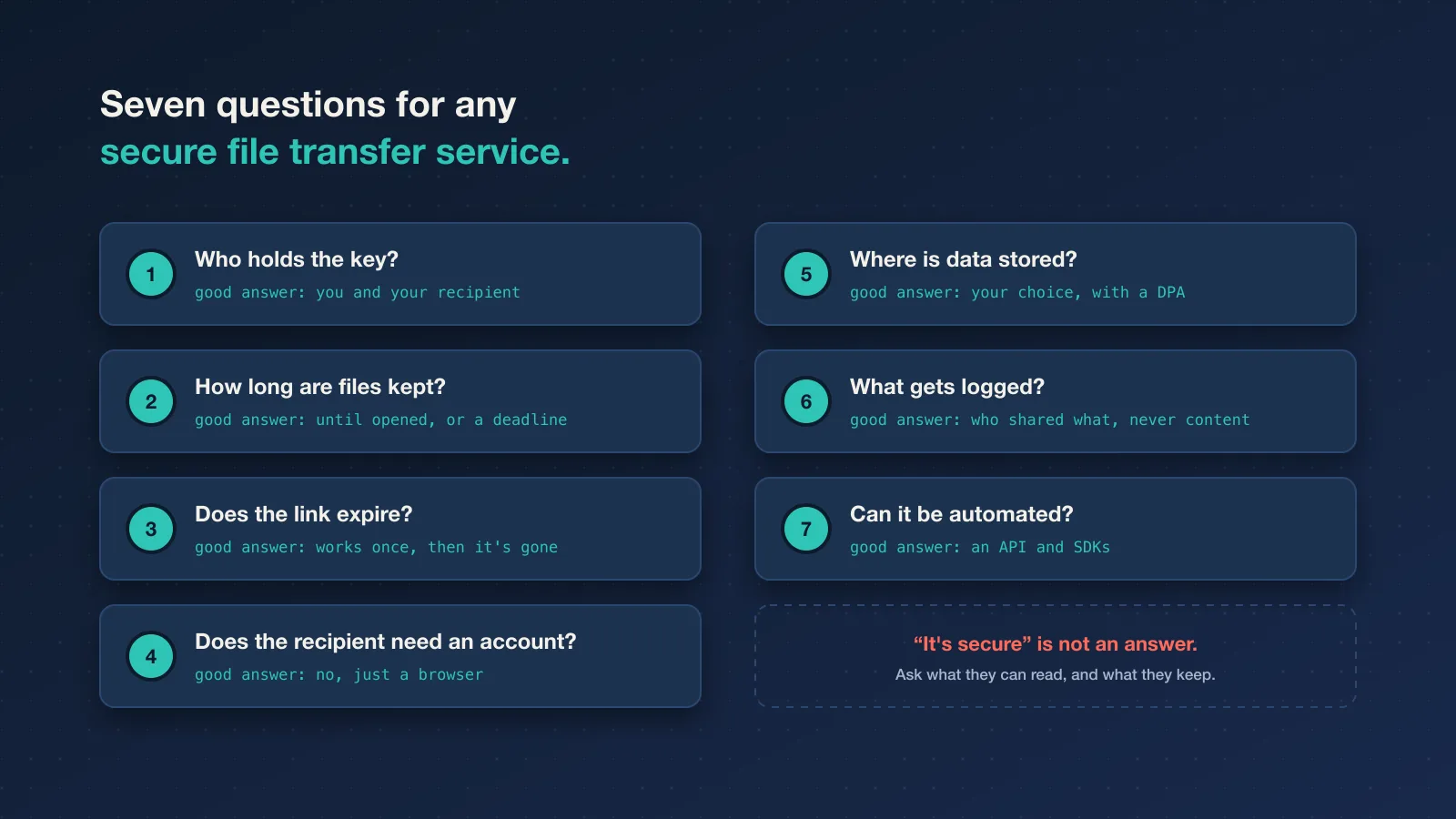
Pulling the trends together, these are the questions that separate tools in 2026:
- Who holds the key? Look for encryption on your device before upload, with the key never sent to the provider.
- How long are files kept? The best answer is "until the recipient opens it, or until a deadline you set".
- Does the link work once, and expire? A link that works forever is a second copy of the file.
- Can recipients open it without an account? If they can't, they'll ask for an attachment instead.
- Where is data stored, and is there a DPA? Check both before you share anything personal.
- What does it log? You want a record of who shared what, without the provider logging the content.
- Can it be automated? An API matters if files come out of your own systems.
For the record, this is how Konfidant answers them. Files and text are encrypted in your browser with AES-256-GCM, and the key sits after the # in the link, which browsers never send to a server. Each link works once; the encrypted file is deleted after it's opened or at expiry. Recipients need nothing but a browser. Paid plans add EU data storage, audit logs of who on your team shared what, your own domain for links, and an API with SDKs. Every customer gets a DPA as part of the Terms.
And the honest limits. Konfidant is built for person-to-person shares: a contract, a payslip, a credential, files up to 200 MB. It isn't a replacement for a managed file transfer system moving gigabytes between servers every night. Nor can it stop a recipient from keeping a file they've opened. Nothing can.
Questions people ask
What's the difference between secure file sharing and secure file transfer?
The terms overlap. "Secure file transfer" often refers to sending a file once to someone, or to managed file transfer systems moving files between companies. "Secure file sharing" can also mean ongoing access, like a shared folder. For sensitive one-off deliveries, what matters is the same: encryption the provider can't undo, and a copy that doesn't stay around. There's a longer list of situations in 10 situations that call for a secure file transfer.
Is AES-256 safe against quantum computers?
As far as anyone currently knows, yes. Quantum attacks are expected to weaken symmetric ciphers like AES rather than break them, and AES-256 keeps a large safety margin. The parts that need replacing are key exchange and signatures, which is what ML-KEM and the other new standards are for.
Should we stop using cloud drives?
No. Shared drives are the right tool for documents people work on together. The problem is using them for one-off delivery of sensitive files, with "anyone with the link" access that nobody remembers to turn off. For that, a secure file share that expires is a better fit.
What about passwords and API keys?
Short secrets have the same problem as files, only smaller. A password manager is right for anything shared regularly; for a credential needed once, use a one time secret link and rotate the credential when the person no longer needs it.
If you want to see what secure document sharing looks like with a key only you and your recipient hold, send your first share free. It takes about a minute.
This article provides general information, not legal advice. It describes Konfidant's features without guaranteeing them; what we provide is set out in our Terms of Service and Data Processing Agreement. Assess whether a tool meets your legal and regulatory requirements before sharing regulated data.
Enjoyed this article?
Get new articles on secrets management and secure sharing in your inbox. No spam, unsubscribe anytime.
We'll email you a link to confirm. Protected by Cloudflare Turnstile. See our Privacy Policy.
Ready to secure your team's secrets?
Stop leaving credentials in Slack. Start using burn-after-reading encryption.
Get started free