Back to all posts
Security

GDPR Compliance: Secure File Sharing for European Businesses

12 min read
By Konfidant Security Team

In May 2023, a UK-based law firm was fined €890,000 for a GDPR violation. The issue? They shared client files containing personal data via unencrypted email and couldn't produce records showing:

  • Who accessed the files
  • When they were accessed
  • When (or if) they were deleted

The data protection authority ruled this was a failure of "appropriate technical and organizational measures" required under GDPR Article 32.

This wasn't a breach by hackers. It was a violation of routine file sharing practices.

For businesses operating in the EU (or handling EU citizens' data), GDPR compliance isn't optional. And file sharing — how you transmit contracts, employee records, customer data, and financial documents — is one of the highest-risk areas.

This guide explains GDPR's requirements for secure file sharing, shows you how to implement compliant workflows, and helps you choose tools that meet EU data protection standards.

GDPR File Sharing Requirements: What You Must Know

The Six Core Principles (Article 5)

GDPR's foundational principles directly impact how you share files:

1. Lawfulness, Fairness, and Transparency

Personal data must be processed lawfully, with a valid legal basis (consent, contract, legitimate interest, etc.).

For file sharing: You must have a legal basis to share personal data with third parties (recipients).

2. Purpose Limitation

Personal data collected for one purpose can't be used for unrelated purposes.

For file sharing: Don't share customer data collected for billing with marketing agencies without explicit consent.

3. Data Minimization

Only collect and retain the minimum personal data necessary.

For file sharing: Don't share entire customer databases when only 10 records are needed. Don't keep files on servers longer than necessary.

4. Accuracy

Personal data must be accurate and kept up to date.

For file sharing: Sharing outdated employee records or customer data can violate this principle.

5. Storage Limitation

Personal data must not be kept longer than necessary.

For file sharing: Files containing personal data should auto-delete after their purpose is served. This is where ephemeral file sharing becomes critical.

6. Integrity and Confidentiality (Security)

Personal data must be processed securely, with protection against unauthorized access, loss, or damage.

For file sharing: Encryption, access controls, and audit trails are mandatory (Article 32).

Article 32: Security of Processing

GDPR Article 32 requires "appropriate technical and organizational measures" to secure personal data, including:

  • Pseudonymization and encryption of personal data
  • Ability to ensure confidentiality (access controls)
  • Ability to restore availability (backup and recovery)
  • Regular testing and evaluation of security measures

For file sharing, this means:

  • Encrypt files in transit and at rest
  • Use access controls (passphrases, user authentication)
  • Maintain audit trails
  • Regularly review and test your file sharing security

Article 30: Records of Processing Activities

You must maintain records showing:

  • What personal data you process
  • Why you process it (legal basis)
  • Who has access to it
  • How long you retain it
  • Technical and organizational security measures

For file sharing: You need audit logs showing who shared what, with whom, and when it was deleted.

Article 17: Right to Erasure ("Right to be Forgotten")

Individuals have the right to request deletion of their personal data.

For file sharing: If a customer requests erasure, you must be able to:

  • Identify all files containing their data
  • Delete them permanently (not just move to trash)
  • Prove deletion

Ephemeral file sharing (auto-deletion) simplifies this.

Article 33-34: Breach Notification

If personal data is breached, you must:

  • Notify the supervisory authority within 72 hours
  • Notify affected individuals if the breach poses a high risk

For file sharing: If files containing personal data are leaked, you need audit logs to determine:

  • What data was exposed
  • Who was affected
  • When the breach occurred

Why Traditional File Sharing Fails GDPR Compliance

Problem #1: Indefinite Data Retention (Violates Storage Limitation)

Traditional file sharing (Dropbox, Google Drive):

  • Files stored indefinitely until manually deleted
  • Shared links remain active forever
  • No automatic expiration

GDPR requirement: Data must not be kept longer than necessary (Article 5(1)(e)).

Violation scenario: You share customer contracts via Dropbox. The project ends, but the files remain on Dropbox for years. This is over-retention.

Problem #2: No Encryption (Violates Security Requirements)

Email attachments:

  • Usually unencrypted at rest on mail servers
  • Unencrypted in transit if TLS is not enforced
  • Accessible to email providers

GDPR requirement: Encryption of personal data (Article 32).

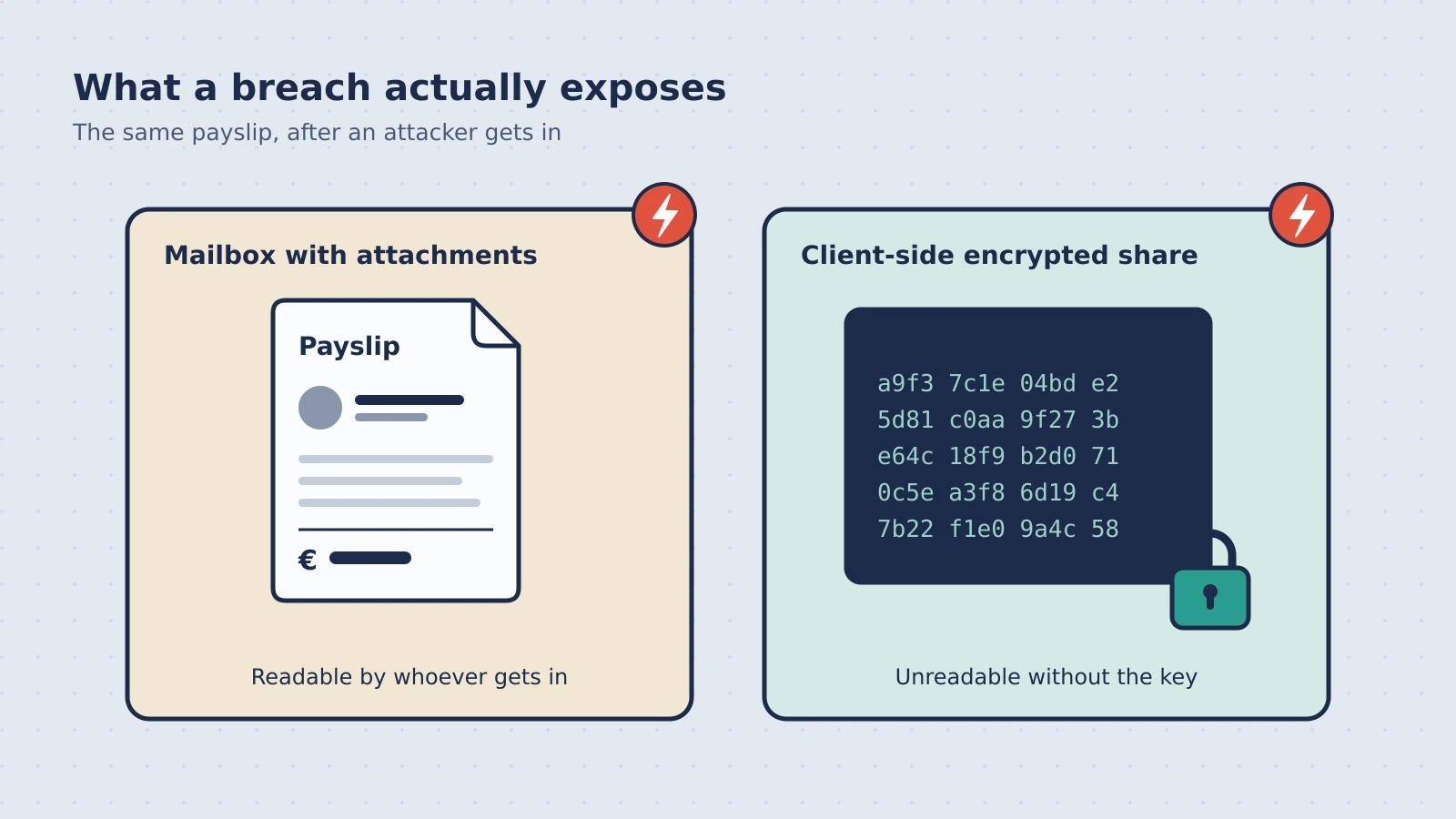
Violation scenario: You email employee payroll data. The email is stored unencrypted on your mail server. If the server is breached, the data is exposed in plaintext.

Problem #3: No Audit Trails (Violates Accountability)

Slack, email, public links:

  • No logs showing who accessed files
  • No proof of deletion
  • Can't demonstrate compliance during audits

GDPR requirement: You must demonstrate compliance (Article 5(2) — accountability principle).

Violation scenario: A customer requests proof you deleted their data after contract termination. You can't produce records showing deletion.

Problem #4: Uncontrolled Data Copies (Violates Data Minimization)

Email forwarding, public links:

  • Recipients can forward files indefinitely
  • No visibility or control over secondary shares
  • Data proliferates beyond original purpose

GDPR requirement: Data minimization — only share what's necessary (Article 5(1)(c)).

Violation scenario: You send customer PII to a contractor via email. The contractor forwards it to a subcontractor. You have no record of this secondary transfer.

Problem #5: Wrong Data Residency (Violates Transfer Rules)

US-based cloud services:

  • Data may be stored in US data centers
  • May be subject to US surveillance laws (CLOUD Act)
  • Requires valid transfer mechanisms (Standard Contractual Clauses)

GDPR requirement: Transfers outside the EU require safeguards (Articles 44-50).

Violation scenario: You upload EU customer data to a US-based file sharing service without ensuring adequate transfer mechanisms.

GDPR-Compliant File Sharing: Requirements Checklist

✅ 1. Encryption (In Transit and At Rest)

Requirements:

  • TLS 1.2+ for transmission (encrypt data between client and server)
  • AES-256 encryption at rest (encrypt stored files)
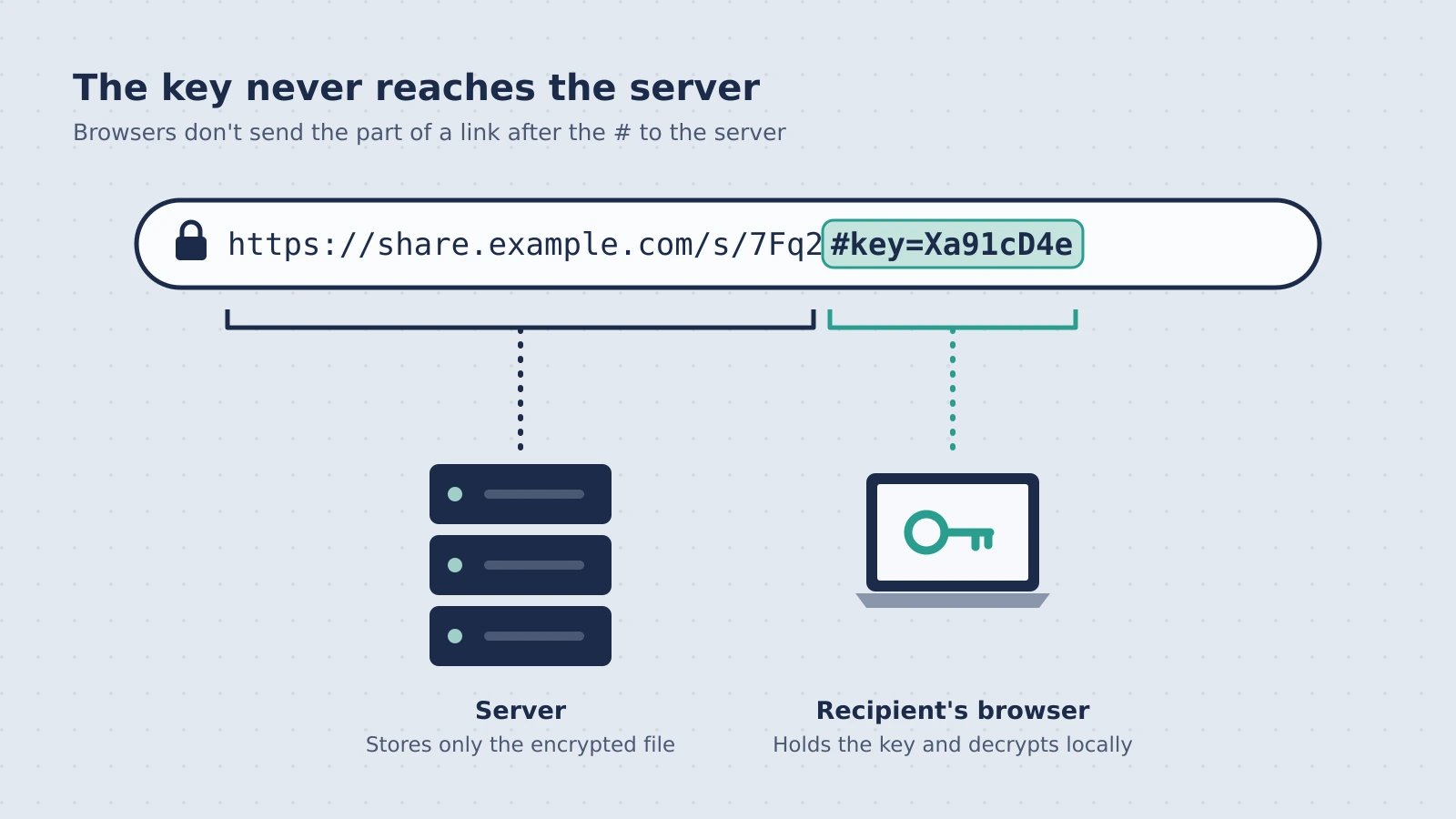
  • Client-side encryption (best practice: encrypt before upload so the server never sees plaintext)

Why: Article 32 requires encryption as a security safeguard.

Implementation:

  • Use services that encrypt by default
  • Verify the encryption algorithm (AES-256-GCM is standard)
  • Prefer zero-knowledge encryption (server can't decrypt)

✅ 2. Access Controls

Requirements:

  • Authentication: Verify recipient identity (email verification, SSO)
  • Authorization: Grant access only to authorized individuals
  • Passphrase protection: Optional second factor (password to decrypt)
  • Time-limited access: Links should expire

Why: Article 32 requires confidentiality measures.

Implementation:

  • Enable passphrase protection for sensitive files
  • Use email verification for recipient identity
  • Set expiration policies (7 days, 30 days, etc.)

✅ 3. Data Minimization

Requirements:

  • Share only the minimum data necessary
  • Auto-delete files after purpose is served
  • No indefinite storage

Why: Article 5(1)(c) and (e) require data minimization and storage limitation.

Implementation:

  • Use ephemeral file sharing (auto-delete after delivery)
  • Set default expiration policies (e.g., 7 days)
  • Avoid sharing entire databases when only a few records are needed

✅ 4. Audit Trails

Requirements:

  • Log who uploaded files
  • Log who accessed files (IP, timestamp, user agent)
  • Log when files were deleted
  • Immutable logs (can't be tampered with)

Why: Article 5(2) requires accountability (demonstrate compliance).

Implementation:

  • Use services with built-in audit logging
  • Export logs for compliance reviews
  • Store logs for the required retention period (varies by member state)

✅ 5. Data Residency (EU Storage)

Requirements:

  • Personal data of EU citizens should be stored in the EU
  • If stored outside the EU, ensure valid transfer mechanisms (Standard Contractual Clauses, Adequacy Decisions)

Why: Articles 44-50 regulate international data transfers.

Implementation:

  • Choose services with EU data residency (Frankfurt, Amsterdam, Dublin data centers)
  • Verify the service complies with GDPR transfer requirements
  • Get Data Processing Agreements (DPAs)

✅ 6. Data Processing Agreements (DPAs)

Requirements:

  • Any third-party service processing personal data on your behalf is a "data processor"
  • You must sign a DPA with them (Article 28)

Why: Controllers (you) must ensure processors (file sharing services) comply with GDPR.

Implementation:

  • Request a DPA from your file sharing provider
  • Verify the DPA includes required clauses (Article 28(3))
  • Don't use services that refuse to sign DPAs

✅ 7. Right to Erasure Support

Requirements:

  • Ability to permanently delete files on request
  • Proof of deletion (verified erasure)

Why: Article 17 gives individuals the right to erasure.

Implementation:

  • Use services with verified deletion (cryptographic proof)
  • Maintain records of deletion events
  • Respond to erasure requests within 30 days

How Ephemeral File Sharing Simplifies GDPR Compliance

Ephemeral file sharing (auto-delete after delivery) directly addresses GDPR's toughest requirements:

1. Automatic Data Minimization

Traditional sharing: Files sit on servers indefinitely (over-retention).

Ephemeral sharing: Files auto-delete after 1 hour, 24 hours, or 7 days (minimal retention).

GDPR benefit: Complies with storage limitation (Article 5(1)(e)) by default.

2. Reduces Breach Exposure

Traditional sharing: Files remain a breach target for weeks or months.

Ephemeral sharing: Files deleted within hours or days — if a breach happens later, the files are already gone.

GDPR benefit: Minimizes risk of breaches requiring notification (Article 33).

3. Simplifies Right to Erasure

Traditional sharing: Must manually identify and delete files on erasure requests.

Ephemeral sharing: Files auto-delete — often already gone by the time the request arrives.

GDPR benefit: Faster response to erasure requests (Article 17).

4. Built-In Accountability

Traditional sharing: No audit trails showing deletion.

Ephemeral sharing: Audit logs prove files were delivered and deleted.

GDPR benefit: Demonstrates compliance during audits (Article 5(2)).

GDPR-Compliant File Sharing Workflows

Workflow 1: Sharing Employee Personal Data (HR)

Scenario: HR shares employee W-2s containing PII (Social Security numbers, salary).

GDPR requirements:

  • Legal basis: Employment contract (Article 6(1)(b))
  • Data minimization: Share only with the specific employee
  • Security: Encryption + access controls
  • Audit trail: Log access events
  • Storage limitation: Delete after employee downloads

Compliant approach using Konfidant:

  1. HR uploads W-2 to Konfidant
  2. Enables client-side encryption (zero-knowledge)
  3. Sets passphrase protection (employee's last 4 SSN digits)
  4. Sets expiration: 7 days or first access
  5. Enables audit logs
  6. Sends link via corporate email
  7. Employee downloads W-2
  8. File is automatically deleted from Konfidant
  9. Audit log records: "Accessed on 2026-04-15 at 14:23 UTC from IP X, deleted immediately after download"

GDPR compliance:

  • ✅ Encrypted (Article 32)
  • ✅ Access controlled (passphrase)
  • ✅ Minimized retention (7 days max)
  • ✅ Audit trail (accountability)
  • ✅ Automatic deletion (storage limitation)

Workflow 2: Sharing Customer Contracts (Legal)

Scenario: Law firm shares a contract containing client PII with opposing counsel.

GDPR requirements:

  • Legal basis: Legitimate interest (Article 6(1)(f))
  • Data minimization: Share only the specific contract, not entire client file
  • Security: Encryption + authentication
  • Audit trail: Prove delivery and deletion
  • International transfer: If opposing counsel is outside the EU, ensure valid transfer mechanism

Compliant approach:

  1. Lawyer uploads contract to GDPR-compliant service (EU data residency)
  2. Sets 30-day expiration
  3. Enables email verification (confirm recipient identity)
  4. Enables audit logs
  5. Sends link to opposing counsel via email
  6. Opposing counsel verifies email and downloads contract
  7. After 30 days, file auto-deletes
  8. Audit log retained for 3 years (proof of compliance)

GDPR compliance:

  • ✅ EU data residency (no international transfer issues)
  • ✅ Encrypted
  • ✅ Access authenticated (email verification)
  • ✅ Time-limited (30 days)
  • ✅ Audit trail

Workflow 3: Sharing Customer Data with Third-Party Processor

Scenario: Marketing agency needs customer email addresses for a campaign.

GDPR requirements:

  • Legal basis: Consent (Article 6(1)(a)) — customers opted into marketing
  • Data minimization: Share only necessary fields (email, first name) — not entire customer records
  • DPA required: Agency is a data processor (Article 28)
  • Purpose limitation: Data can only be used for the specified campaign
  • Storage limitation: Agency must delete data after campaign ends

Compliant approach:

  1. Export only necessary customer data (email, first name) — not full database
  2. Share via encrypted file transfer (not email attachment)
  3. Set 30-day expiration (campaign duration)
  4. Require agency to sign DPA before sharing
  5. DPA specifies: data must be deleted within 30 days
  6. Enable audit logs to prove data was deleted after 30 days

GDPR compliance:

  • ✅ Data minimization (only necessary fields)
  • ✅ DPA in place (Article 28)
  • ✅ Purpose limitation (only for specified campaign)
  • ✅ Storage limitation (30-day auto-delete)

Choosing a GDPR-Compliant File Sharing Service

Required Features

FeatureWhy It's RequiredHow to Verify
EU data residencyAvoid international transfer issuesAsk: "Which data centers store my files?" (Look for Frankfurt, Amsterdam, Dublin)
Data Processing Agreement (DPA)Required for processors (Article 28)Request DPA before using service
Encryption (AES-256)Security safeguard (Article 32)Check documentation for encryption algorithm
Audit logsAccountability (Article 5(2))Verify logs include: who, what, when, IP
Access controlsConfidentiality (Article 32)Verify: passphrase, email verification, expiration
Verified deletionRight to erasure (Article 17)Ask: "Can you prove files are deleted?"
Client-side encryptionBest practice (zero-knowledge)Check if encryption happens in browser before upload

Red Flags (Non-Compliant Services)

No DPA available: If a service refuses to sign a DPA, they're not GDPR-ready.

No EU data residency: US-only storage requires Standard Contractual Clauses or Adequacy Decisions.

No audit logs: Can't demonstrate compliance without logs.

No encryption details: If they claim "encrypted" but won't specify the algorithm, be skeptical.

Indefinite retention by default: Files that never expire violate storage limitation.

Recommended GDPR-Compliant Services

For ephemeral file sharing:

  • Konfidant: Zero-knowledge encryption, EU data residency, audit logs, DPA available, automatic deletion
  • Tresorit: Swiss-based, end-to-end encryption, GDPR-compliant
  • PrivateBin (self-hosted): Open-source, full control over data residency

For long-term collaboration:

  • Nextcloud (self-hosted): EU-based hosting, full control, GDPR plugins
  • OnlyOffice: GDPR-compliant, EU data residency options

For password/credential sharing:

  • Bitwarden (self-hosted or EU cloud): Open-source, EU data residency, DPA available
  • 1Password (with EU residency): DPA available, SOC 2 compliant

GDPR Penalties: What's at Risk

Fines

GDPR fines are tiered based on severity:

Tier 1 violations (e.g., inadequate security, no DPA):

  • Up to €10 million or 2% of global annual turnover (whichever is higher)

Tier 2 violations (e.g., unlawful processing, data breaches):

  • Up to €20 million or 4% of global annual turnover (whichever is higher)

Real-world examples:

  • British Airways (2020): £20 million for data breach (reduced from £183 million)
  • Google (2019): €50 million for lack of transparency and invalid consent
  • H&M (2020): €35.3 million for excessive employee data collection

Reputational Damage

Beyond fines, GDPR violations create:

  • Loss of customer trust
  • Negative media coverage
  • Competitive disadvantage (customers choose compliant competitors)

GDPR File Sharing Action Plan

Immediate (This Week)

  1. Audit current file sharing practices:

    • How do you currently share customer data, employee records, contracts?
    • Are you using email, Dropbox, Google Drive, Slack?
    • Do these services have DPAs?
  2. Identify high-risk files:

    • Customer PII (names, emails, addresses)
    • Employee PII (SSNs, payroll data)
    • Health data (PHI)
    • Financial records
  3. Stop using non-compliant methods:

    • No more unencrypted email attachments for personal data
    • No more indefinite Dropbox links for customer files

This Month

  1. Choose GDPR-compliant tools:

    • Select an ephemeral file sharing service (Konfidant, Tresorit)
    • Select a long-term collaboration tool (Nextcloud, OnlyOffice)
    • Get DPAs from all services
  2. Document your policies:

    • When to use ephemeral vs. long-term sharing
    • Default expiration periods (7 days, 30 days)
    • Required security measures (encryption, passphrase protection)
  3. Train your team:

    • Explain GDPR requirements
    • Show them how to use compliant tools
    • Make the compliant method easier than the non-compliant method

Ongoing

  1. Conduct quarterly audits:

    • Review audit logs
    • Check for over-retention (files not deleted)
    • Verify DPAs are up to date
  2. Respond to data subject requests:

    • Erasure requests: Verify files are deleted within 30 days
    • Access requests: Provide audit logs showing file access history
  3. Update risk assessments:

    • If you change file sharing services, conduct a Data Protection Impact Assessment (DPIA)
    • Review transfer mechanisms if using non-EU services

Frequently Asked Questions

Do I need a DPA for every file sharing service?

Yes, if the service processes personal data on your behalf (even temporarily).

Example: If you use Konfidant to share customer contracts, Konfidant is a data processor. You need a DPA.

Exception: If the service only transmits data (like a VPN), it may not be a processor. Consult a data protection officer.

Is encryption alone enough for GDPR compliance?

No. Encryption is required (Article 32), but GDPR also requires:

  • Data minimization
  • Storage limitation
  • Audit trails
  • DPAs

Encryption is necessary but not sufficient.

Can I use US-based services like Dropbox or Google Drive?

Yes, if:

  1. The service provides EU data residency (data stored in EU data centers)
  2. You sign Standard Contractual Clauses (SCCs)
  3. The service complies with GDPR's processor requirements

Check: Does the service have a GDPR-compliant DPA? Do they offer EU-only storage?

What if I accidentally share personal data via email?

  1. Recall the email if possible (Outlook, Gmail have recall features)
  2. Ask recipient to delete the email
  3. Notify your DPO (Data Protection Officer) or GDPR lead
  4. Assess breach severity: If high risk, you may need to notify the supervisory authority within 72 hours (Article 33)

Prevention: Use ephemeral file sharing instead of email attachments.

How long should I retain audit logs?

GDPR doesn't specify, but best practices:

  • Minimum: 1 year
  • Recommended: 3 years (aligns with many national data retention laws)
  • Regulated industries: May require longer (e.g., 7 years for financial records)

Tip: Consult your national data protection authority's guidelines.

What if a customer requests deletion but I'm legally required to retain their data?

GDPR allows exceptions (Article 17(3)):

  • Legal obligations (e.g., tax records retention)
  • Public interest (e.g., public health data)
  • Legal claims (e.g., ongoing litigation)

Response: Inform the customer which exception applies and how long you must retain the data.

The Bottom Line

GDPR isn't just about avoiding fines — it's about building trust with customers and employees by handling their data responsibly.

Secure file sharing is one of the highest-risk areas:

  • Emailing contracts exposes personal data
  • Dropbox links that never expire violate storage limitation
  • No audit trails mean you can't prove compliance

The GDPR-compliant file sharing framework:

  1. Encrypt everything (in transit and at rest)
  2. Minimize retention (ephemeral sharing, auto-delete)
  3. Control access (passphrases, authentication)
  4. Log everything (audit trails for accountability)
  5. Locate data in the EU (data residency)
  6. Sign DPAs with processors

The tools exist. The workflows are practical. The only question is whether you'll implement them before an audit (or a fine) forces you to.


Ready to make your file sharing GDPR-compliant? Try Konfidant's EU-hosted, encrypted file sharing →

Ready to secure your team's secrets?

Stop leaving credentials in Slack. Start using burn-after-reading encryption.

Get started free